Head-to-Head Comparisons
Maverick vs. the Competition: Which Tool Wins?
Not all project management tools are built the same. Maverick Project Scheduler is purpose-built for real scheduling — with a CPM engine, resource management, and embedded AI that actually builds your plan. See how it stacks up.
Try Maverick FreeNo comparisons matched your search. Ask us directly.
Why the Tool You Choose Matters
Generic work management platforms and true project scheduling software are very different things. If your projects have dependencies, deadlines, resources, and real stakes, the gap between tools becomes clear fast.
Scheduling Engine
A real scheduling engine cascades date changes automatically. Task A slips? Every dependent task shifts. Most tools only move bars visually.
Resource Management
Knowing who is overloaded — before they are — requires allocation tracking. Color-coded conflict alerts save projects before they derail.
AI That Schedules
AI that writes status updates is not the same as AI that builds and restructures a project plan. Maverick does the latter.
Explore the Comparisons
Each comparison page covers Gantt charts, resource management, AI, time tracking, pricing, and more — with an honest look at where each tool excels.
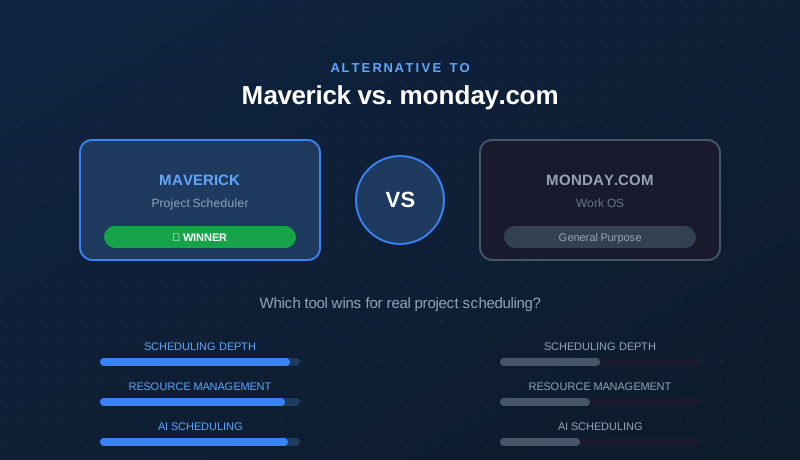
Maverick vs. monday.com
monday.com is a popular work OS with great boards and automations. But for project schedulers who need Gantt, CPM, and resource allocation, the comparison tells a clear story.
Read the monday.com comparison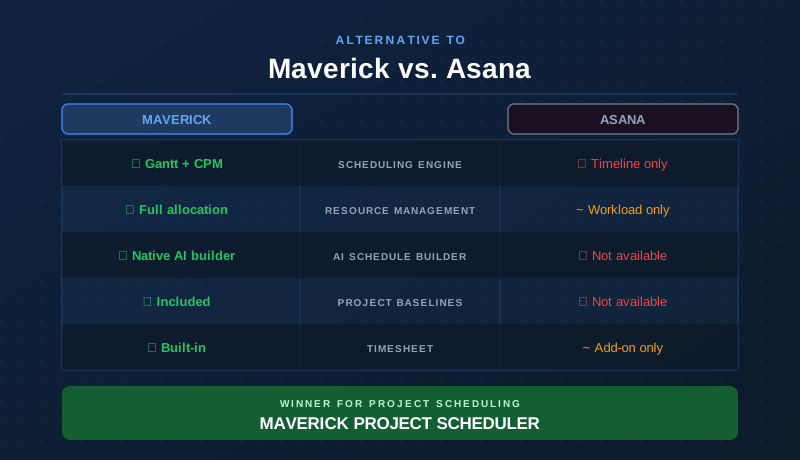
Maverick vs. Asana
Asana is a polished task management platform with great collaboration tools. But for project schedulers who need Gantt, CPM, and resource allocation, the comparison tells a clear story.
Read the Asana comparison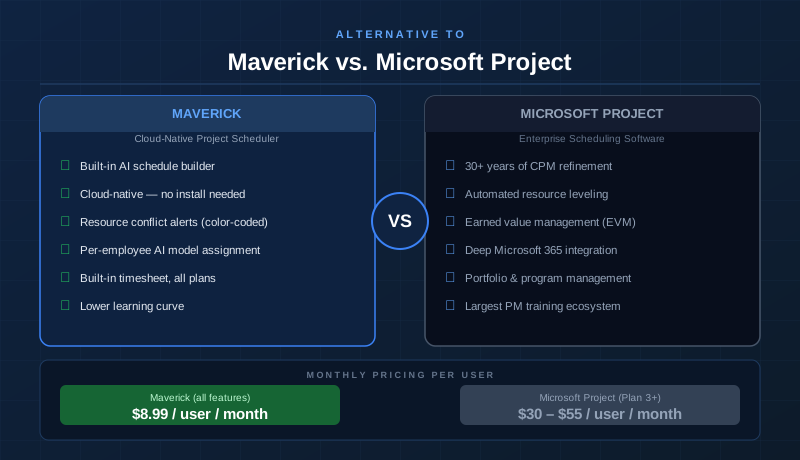
Maverick vs. Microsoft Project
Microsoft Project is the gold standard for enterprise scheduling. See how Maverick's cloud-native approach, AI scheduling, and significantly lower price compare head-to-head.
Read the Microsoft Project comparison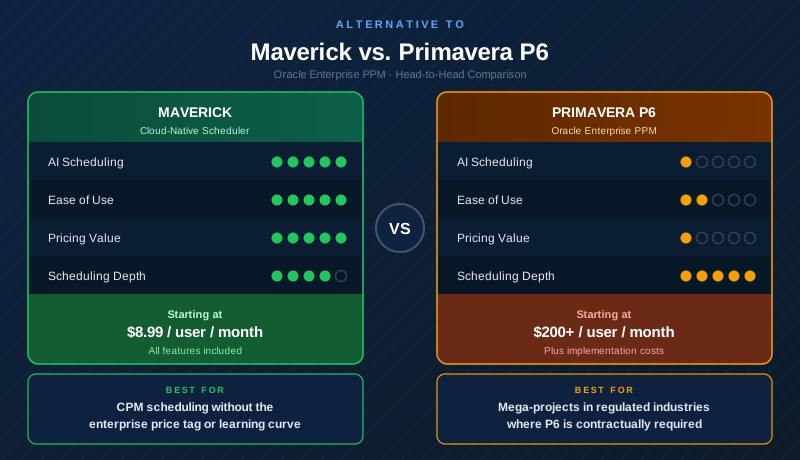
Maverick vs. Primavera P6
Oracle Primavera P6 Professional Project Management (PPM) is the benchmark for mega-project scheduling in construction, oil and gas, and defense. See how Maverick delivers real CPM scheduling without the enterprise price tag or 40-hour learning curve.
Read the Primavera P6 comparison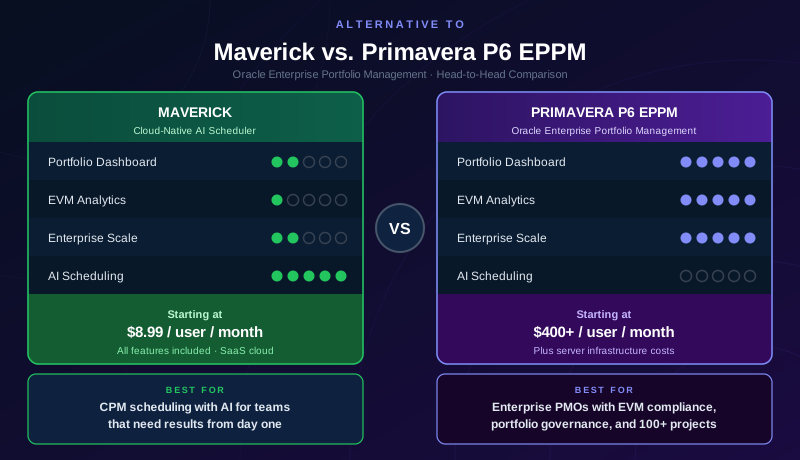
Maverick vs. Primavera P6 EPPM
Oracle Primavera P6 EPPM adds server-based portfolio dashboards, enterprise resource pools, and cross-project EVM analytics on top of the P6 scheduling engine. See how Maverick's AI scheduling and SaaS pricing compare to the full enterprise platform.
Read the Primavera P6 EPPM comparison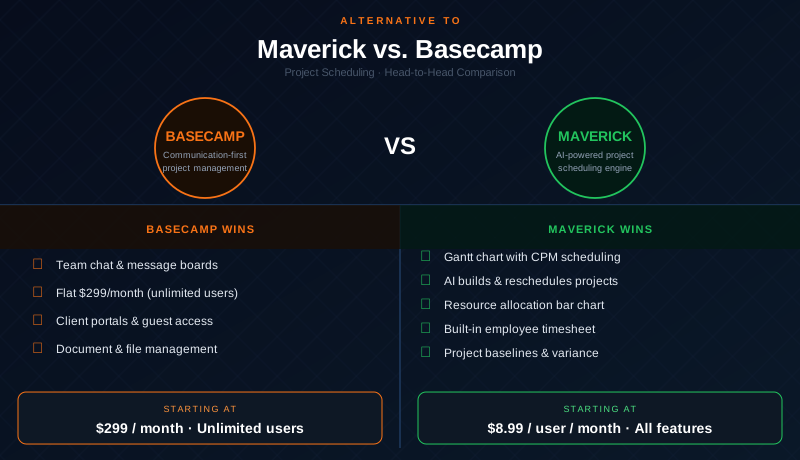
Maverick vs. Basecamp
Basecamp is a beloved team workspace with great communication tools and flat pricing. But for project managers who need Gantt charts, CPM, resource allocation, and AI scheduling, the comparison tells a clear story.
Read the Basecamp comparison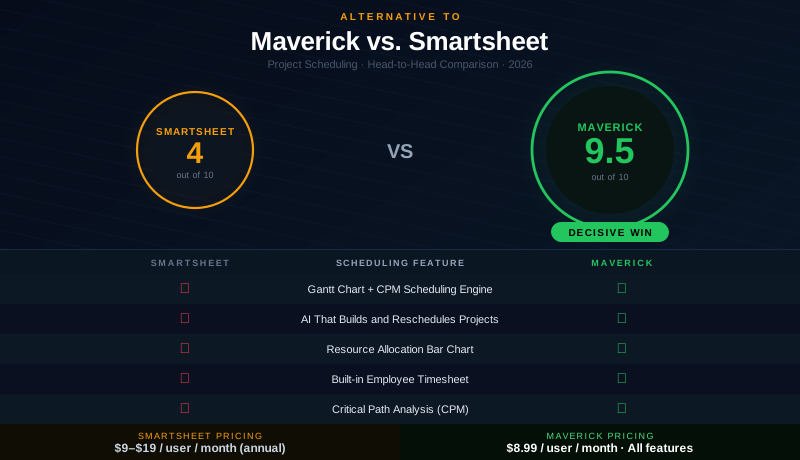
Maverick vs. Smartsheet
Smartsheet is a popular spreadsheet-style work management platform with strong automations and dashboards. For project managers who need Gantt charts, CPM scheduling, resource allocation, and AI that builds real plans — the comparison is decisive.
Read the Smartsheet comparison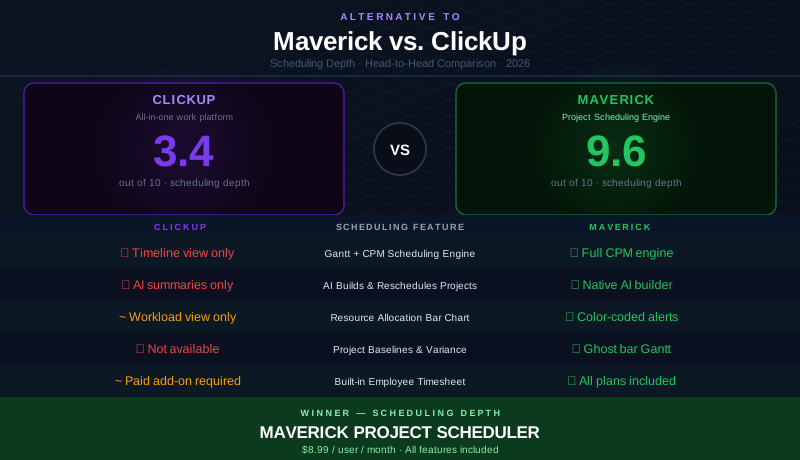
Maverick vs. ClickUp
ClickUp promises to replace every tool with one app. But for project managers who need Gantt charts, CPM scheduling, resource allocation, and AI that builds real plans, scheduling depth matters more than breadth.
Read the ClickUp comparison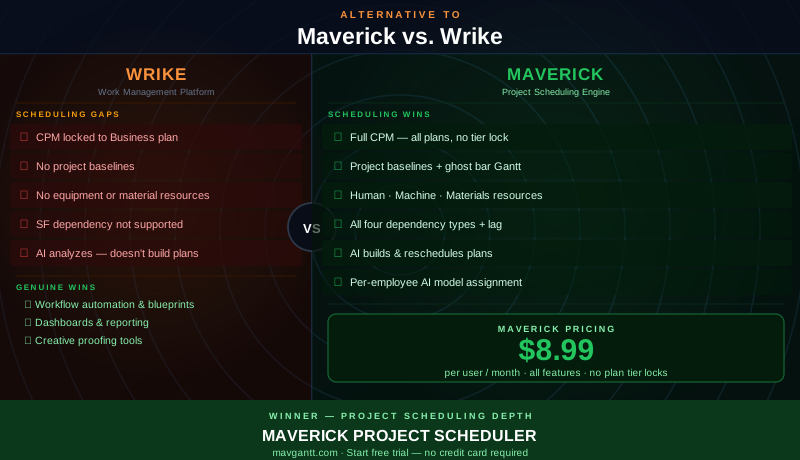
Maverick vs. Wrike
Wrike is a capable work management platform with strong workflow automation and dashboards. For project managers who need CPM scheduling, all four dependency types, three resource types, and project baselines, the comparison reveals a clear gap in scheduling depth.
Read the Wrike comparison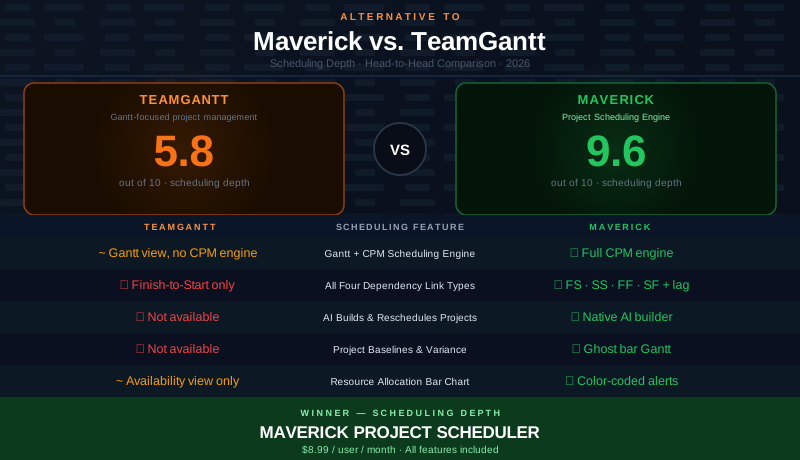
Maverick vs. TeamGantt
TeamGantt is a clean, friendly Gantt tool — but without CPM, critical path analysis, all four dependency types, or AI scheduling, there is a ceiling on what it can do for serious project delivery.
Read the TeamGantt comparison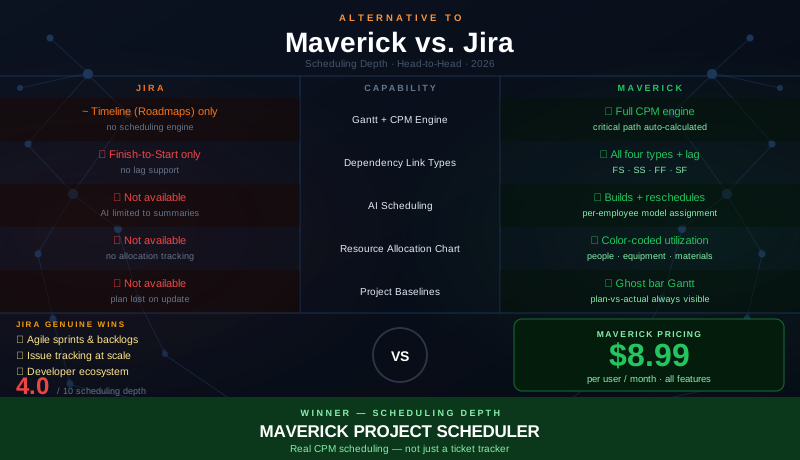
Maverick vs. Jira
Jira is the gold standard for agile sprint management and issue tracking. But its Roadmaps timeline is not a scheduling engine — no CPM, no critical path, no baselines, and only Finish-to-Start dependencies.
Read the Jira comparison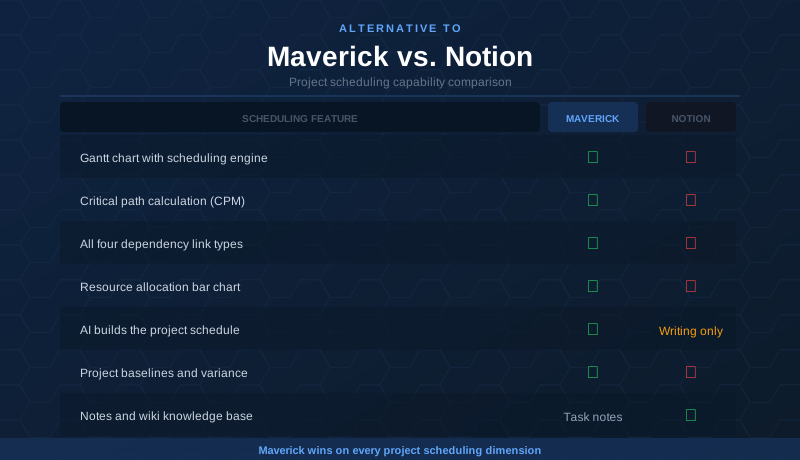
Maverick vs. Notion
Notion is a beautiful workspace for notes, wikis, and lightweight task lists. But its timeline view is cosmetic — no CPM, no dependency scheduling, no resource management. Teams that outgrow Notion for project delivery find Maverick fills the gap.
Read the Notion comparison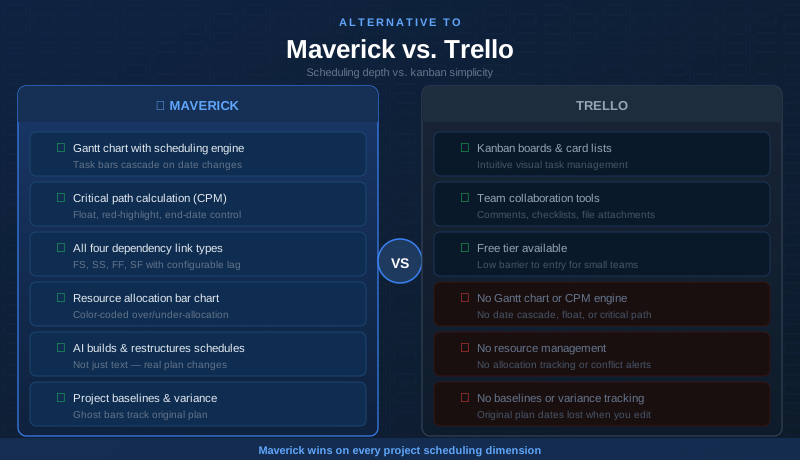
Maverick vs. Trello
Trello is a polished kanban tool — great for simple task boards and lightweight workflows. But kanban and project scheduling are different disciplines. When you need Gantt charts, CPM, resource allocation, and dependency logic, the comparison is decisive.
Read the Trello comparison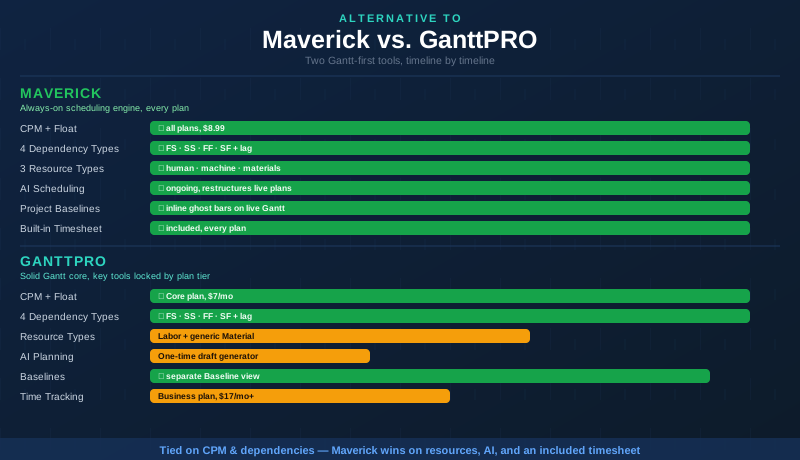
Maverick vs. GanttPRO
GanttPRO ties Maverick on CPM and dependencies right out of the gate. The real gap shows up in resource modeling, plan-gated tools, and how deeply AI stays involved in a live project.
Read the GanttPRO comparison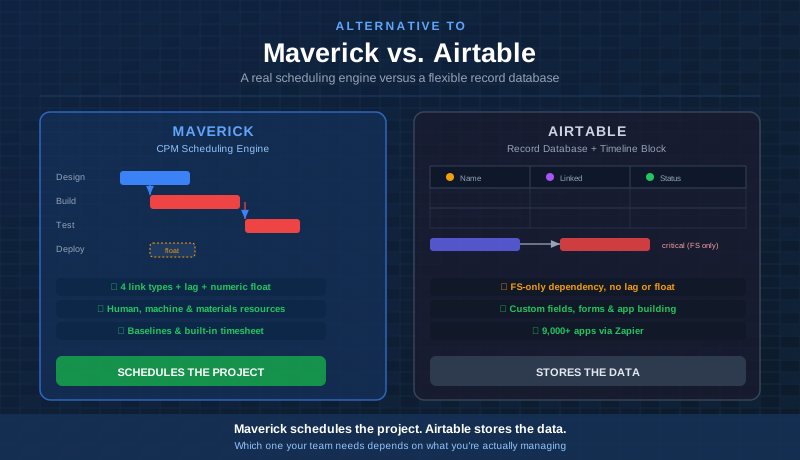
Maverick vs. Airtable
Airtable's 2025 timeline update added basic dependencies and a critical-path highlight to its record database. See where that still falls short of a real CPM scheduling engine.
Read the Airtable comparisonWhat Sets Maverick Apart
Across every comparison, these are the capabilities that consistently separate Maverick from general-purpose project management tools.
AI Scheduling — Not Just Chatbots
Maverick's AI reads your project, rewrites the schedule, assigns resources, and flags risks. It does not just summarize what you already know.
See AI in actionPer-Employee AI Model Assignment
Assign different AI providers and models to individual team members. Power users can run premium models while the broader team uses a cost-efficient one — all in one account.
See AI model assignmentCritical Path Method
Maverick calculates the critical path automatically — highlighting which tasks control your end date and how much float non-critical tasks have. Most competitors do not offer this.
Learn about CPMFour Dependency Link Types
Finish-to-Start, Finish-to-Finish, Start-to-Start, and Start-to-Finish — with lag days on every relationship. Most tools offer only basic predecessor linking.
See link typesResource Allocation Chart
Color-coded bar chart shows every resource's utilization by day, week, or month. Over-allocated resources are flagged before they become a problem.
View resource toolsThree Resource Types
Track human resources, equipment, and materials separately — each with their own schedules and allocation logic. Most tools only model people, leaving equipment and supply constraints invisible.
See resource typesProject Baselines
Snapshot your original plan, then compare actual progress against it throughout the project lifecycle. Ghost bars on the Gantt show variance at a glance.
Read about baselinesBuilt-in Timesheet
No add-on required. Every team member logs hours directly in Maverick — filtered by user, project, and date range. Actuals flow back into cost calculations automatically.
Explore time tracking